5-Step Power BI Health Check Consultancy Services
5-Step Power BI Health Check
Our 5 step Power BI Health Check can help you take stock of your Power BI estate, reduce risk, improve performance, lower your costs, build greater trust and achieve sustainable success.

Our 5 step Power BI Health Check can help you take stock of your Power BI estate, reduce risk, improve performance, lower your costs, build greater trust and achieve sustainable success.
Many organisations have been working with Power BI for some years now and there are inevitable challenges that arise when a Power BI implementation evolves organically rather than growing around a data strategy and strict guardrails for implementation.
What was, at the start a transformational agile data analytics solution may have evolved into a high maintenance, fragmented and non-compliant BI solution.
Power BI solutions that organically grown over time are likely to suffer from one or more of the following challenges now:
- Report Sprawl
- Duplicate metrics
- Conflicting data from unvalidated yet published dashboards
- Bloated or Inefficient Semantic Models
- Exceeding capacity limits of Power BI subscriptions
- Workspace Chaos
- Governance challenges with Security Risks
- Undocumented datasets and complex DAX or Power Query
- Lack of visibility of Data Lineage
- Performance challenges
- Over allocation of Power BI licenses
- Self-taught report creators using inefficient or out of date design techniques
- Lack of standardisation Across Dashboard Design
- Inefficient licensing models
Has your Power BI world spiralled into Report Sprawl, Semantic Model Bloat and runaway performance and governance?
If you find yourself in this situation there is a solution - take a step back and work on a Power BI recovery roadmap.
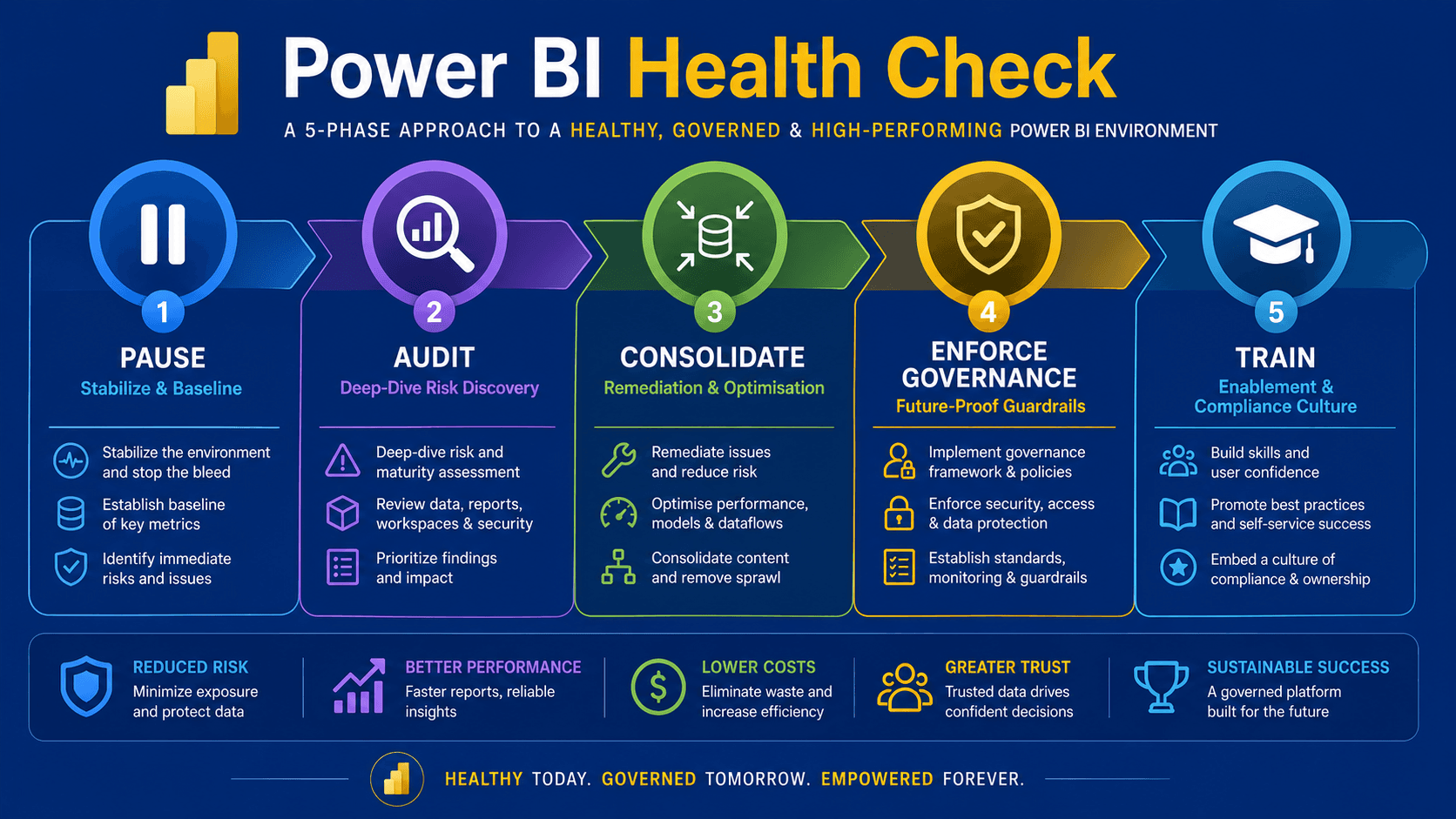
We have a five step Power BI Health Check service which centres on the following steps
- Pause
- Audit
- Consolidate
- Enforce Governance
- Train
Power BI Health Check service
Recognising that you have a potential issue is the first very important step. Unchecked you could be heading into dangerous territory where:
- Your Power BI solution comes to its knees and users are unable to access the business critical dashboards they now rely on
- You experience data security breaches due to poor permissions and access policies
- Your platform and service costs spiral as the Power BI landscape grows organically rather than by plan
One thing is for sure - doing nothing is going to cost you dearly at some point.
Our Power BI Health Check service is designed to get you back on track by taking stock of what you have today and assessing where you want to be.
Pause
The most important first step is to halt any further expansion while you investigate and establish new baselines and guardrails for going forward.
During this pause phase non-essential report deployments should be stopped and configuration changes should be frozen to prevent changes occurring while you investigate and assess.
It is also important to take a baseline performance check at this stage. Generate reports showing:
- Power BI capacity usage if Power BI Premium or Microsoft Fabric is in use
- Active Users
- Gateway statuses
Audit
The Audit phase is a deep dive into your entire Power BI estate. During this phase we look at:
- Tenant infrastructure
- Workspaces
- Reports
- Report usage statistics
- Semantic models
- Data Lineage
- Security & governance
The objective for the audit will be to identify all potential security and performance threats and to produce a report that details all findings categorised as severity (Critical, High, Medium, Low).
Consolidate
The consolidation phase acts as the immediate remediation plan and addresses threats and issues identified in the Audit phase. During this stage of the health check we identify scenarios including but not limited to:
- Duplicate datasets and abandoned reports for archiving or decommissioning
- Isolated semantic models that should be redesigned into shared datasets
- Inefficient DAX measures that need re-engineering
- High cardinality metadata columns that could be removed
- Disparate gateway connections that need to be streamlined
- Workspace sprawl
- Role Based Access Control (RBAC) opportunities with Row Level Security (RLS)
- Transition from individual report access to Power BI Apps
- Identify Data Sensitivity requirements and move to sensitivity labelling
- Scattered user credentials that should be consolidated centrally
- Identify workspaces with Admin and Owner rights
Objectives for this consolidation phase will include:
- A streamlined workspace architecture
- A library of certified and centralised master datasets
- Move to least privilege model
- Report access through security groups rather than individuals - Entra ID Mapping Matrix
- Centralised data connections
Enforce Governance
The consolidation phase addressed some immediate actions, but we also need to look forward and ensure that guardrails and security policies are put in place to ensure we don't go done the same path in the future.
During this phase we are focussed on moving from a reactive clean-up to a proactive defense. We look at establishing permanent rules around best practice, security and compliance.
There will be a number of fairly immediate actions that come from this phase and there will be ongoing guidelines that all those working with Power BI will need to be made aware of.
Some of the immediate actions likely to come out of this phase are:
- Define and implement a standardised workspace architecture
- Separate DEV, TEST and PROD environments
- Enforce Row Level Security (RLS)
- Enforce Microsoft Purview Information Protection sensitivity labels
- Deploy Endorsement Policies
- Limit key data steward users to certify or promote datasets
- Configure tenant settings to restrict dangerous features
- Public web sharing
- Unmanaged external sharing
For the longer term plan compliance rules need to be implemented and wherever possible these should be enforced through tenancy settings rather than leaving it to users to determine, and ensure that guardrails that cannot be enforced through configuration are communicated effectively to staff to ensure they are followed.
- Permanently disable "Publish to Web" globally, or restrict it to a highly vetted, IT-controlled security group for public marketing data only
- Disable the ability for all users to create new workspaces
- Restrict the sharing of reports with external guest users
- If using Microsoft Fabric or Premium, tightly control tenant settings regarding where data can be sent for AI processing, preventing sensitive corporate data from leaving compliance boundaries
- Mandate that all production content moves through a strict deployment pipeline
- Enforce a strict rule that reports and datasets must live in separate workspaces
- Mandate that business users never access workspaces directly
- Control how metrics are defined and validated to protect your "single source of truth"
- Integrate automated tools like ALM Toolkit or Tabular Editor into deployment pipelines
- Leverage automated monitoring so compliance scales alongside your business growth
- Enforce a tenant-wide rule that a PBIX file cannot be published to the cloud unless a Microsoft Purview sensitivity label (e.g., Internal, Confidential, PII Excluded) is applied
- Configure Microsoft Defender for Cloud Apps to trigger immediate alerts or automatic access revokation if a user attempts to export an unusually large volume of data to Excel from a high-security report
- Implement an automated Power Automate script that scans the tenant monthly. If a workspace owner leaves the company, the script automatically reassigns ownership to their manager or a central IT mailbox
The objective for the Enforce Governance phase is:
- Set permanent rules for the enterprise
- Produce a living document that details roles, responsibilities and access rules
- Create a locked-down snapshot of all Admin Portal settings, requiring change-board approval to alter
- Provide a mechanism for users to requests new workspaces or capacities
Train
The fifth and final phase of the Power BI Health Check, Training, is a vital stage. If we do not communicate security & governance policies, guardrails and best practice to our users then nothing will change and we will be back to Power BI sprawl and bloat again in no time at all.
The human element is key in a successful Power BI solution and adequate training is the only way to guarantee user adoption whilst maintaining user enablement.
We must teach users how to handle data safely and not just how to build pretty charts if we are to develop them from passive data consumers to active data stewards.
The training phase should focus on the following:
- Establish a central Centre of Excellence (CoE) hub in SharePoint or Microsoft Teams to host templates and guidelines
- "Before You Publish" Security Checklist
- Template Library
- Deliver targeted training workshops for "Pro" users covering shared datasets, field parameters, and optimal DAX design patterns
- Launch standard corporate report templates to ensure visual consistency across all departments
- Provide data literacy sessions for executives and business users on how to discover and interact with certified content
- Provide secure development, visualisation and workspace management standards training for report creators and self-service analysts
- Provide infrastructure protection, model security and lifecycle management training for data stewards and workspace administrators
- Provide user groups and clinics to promote sharing of experience, mentoring and collaboration
How Can PTR Help?
We can work with you at any level you require. You may have travelled part way down this route and need support and guidance in specific areas or you may need help with the whole health check.
Some of our clients have asked us to map out the framework for a Power BI health check providing templates and questionnaires that can be completed internally to map out immediate actions and future governance and guidance needs.
Equally we have delivered the whole service of all five stages to deliver concise action plans, Centre of Excellence (CoE) checklists, guidelines and templates, and training programmes.
Our 5-step roadmap for a Power BI health check minimises disruption to your daily operations while helping you to get back on track rebuilding a healthy working practise within your Power BI world.
We will support you through necessary changes to achieve a securely guarded, highly performant and trusted Power BI solution.
Why Choose PTR?
PTR brings verified, enterprise-grade technical expertise to your data strategy as a certified Microsoft Solutions Partner in Azure, Data and AI, specialising in Microsoft Azure, Power BI and Fabric.
We do not just hand you a long list of technical problems and walk away; we actively partner with you to implement real, lasting remediation plans.
Our methodology prioritises minimizing disruption to your daily operations while transforming fragmented report sprawl into a trusted, highly secure "single source of truth".
Additionally, we ensure that your data governance policies, access models, and security baselines are constructed to the highest industry standards.
Contact us to discuss how we can help you with our 5-step Power BI Health Check:
- Pause (Stabilize & Baseline)
- Audit (Deep-Dive Risk Discovery)
- Consolidate (Remediation & Optimisation)
- Enforce Governance (Future-Proof Guardrails)
- Train (Enablement & Compliance Culture)
Frequently Asked Questions
Couldn’t find the answer you were looking for? Feel free to reach out to us! Our team of experts is here to help.
Contact Us