

AI Strategy
Working with AI Agents Securely in Your Own Azure Tenancy
One misread instruction can cost you a workspace. Give every AI agent its own narrow identity, add guardrails as a backstop, and keep it safely inside your Azure tenancy.

Published
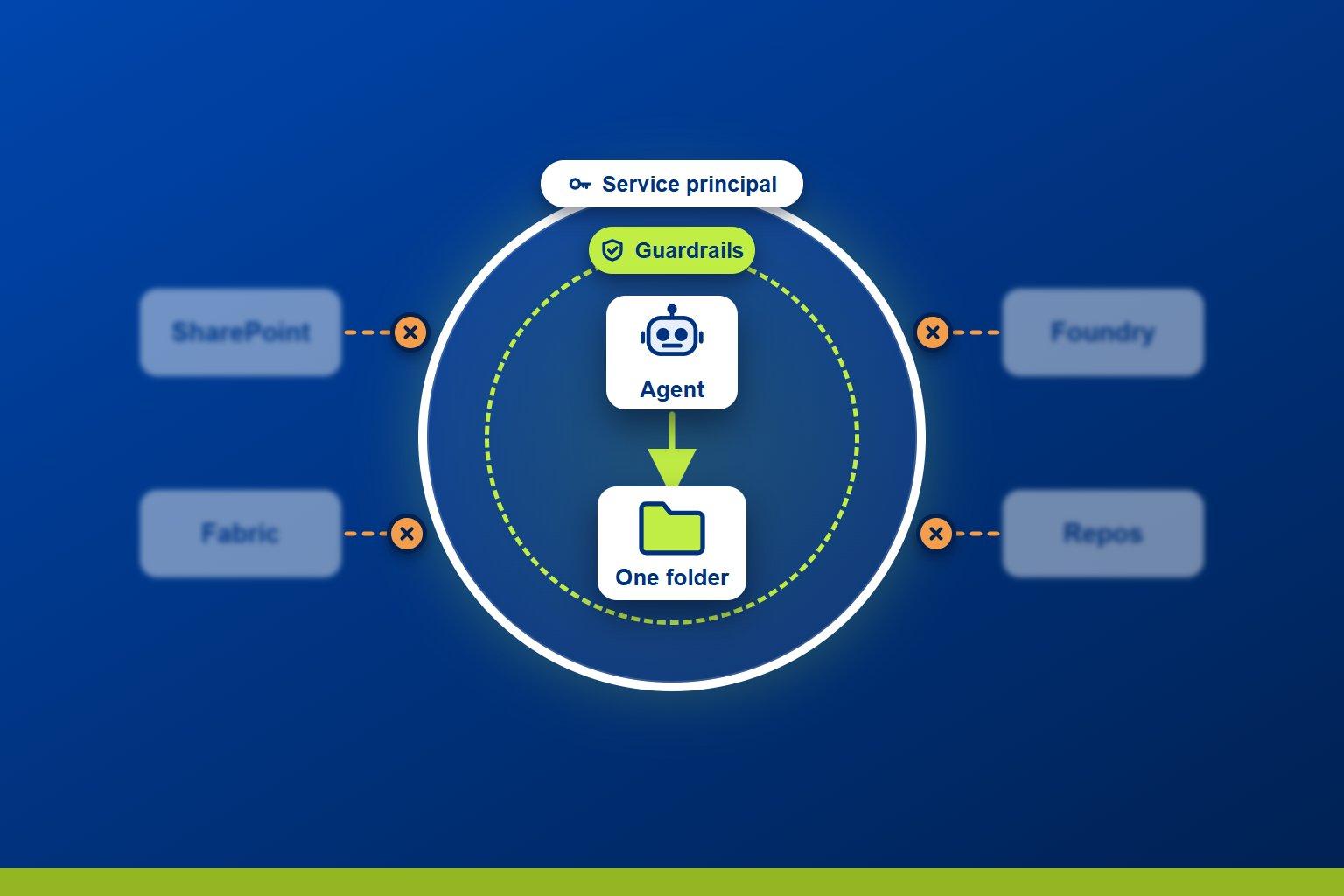
AI agents are now practical tools for real business work. They can read documentation, analyse data and produce reports in minutes. But one misread instruction or one hallucination, and an agent working under the wrong credentials could delete a whole workspace, wipe folders of vital business reporting, or put personal client data somewhere it absolutely shouldn't be.
Nine times out of ten, even 99 times out of 100, everything might work perfectly. That one time it goes wrong can be incredibly damaging, and that isn't a way you can run a business.
This post covers how I've approached that problem: how to bring AI agents into your own Azure environment without compromising on security, and with confidence that what you're doing is safe, controlled and well thought out.
The context: agents across our own tenancy
I've been building internal tools at PTR that use agentic AI and PowerShell to analyse documentation and produce internal reports. Some of that work draws on Microsoft Foundry agents, and some uses Claude Code running locally.
To do their job, these tools touch a lot of our tenancy: SharePoint, Microsoft Foundry, Microsoft Fabric workspaces and Azure DevOps repos. Every one of those connections is a place where an agent could do something it shouldn't.
The problem: an agent inherits whatever identity it runs as
This was my first concern when I started, and I suspect it's a lot of people's. An agent can access anything its credentials allow.
If you run an agent like Claude Code from your own machine and connect to internal resources with your work account, that agent immediately has access to everything you have access to. Every workspace, every SharePoint site, every repo. That's a security issue, and a potential disaster waiting to happen.
So the question becomes: how do you work with agents in a way you can prove to yourself is safe, secure and well controlled? My answer has two layers, plus a way to test them.
Layer 1: control what the agent can reach, before it reaches anything
The first and most important step happens before the agent ever runs: control exactly what it has access to.
I do this with app registrations and service principals. A service principal is effectively a dedicated account for an application. I create them for specific projects or specific agentic tasks, and grant each one access only to what it needs, at only the level it needs.
Scope it to the resource. If an agent should only work in one folder, that folder is the only thing its service principal can see. Nothing else exists as far as it's concerned.
Scope it to the action. If an agent should only read, its credentials only have read access. It can't delete what it has no permission to delete, whatever it misreads.
Use the granular options the platform gives you. For SharePoint, the Microsoft Graph "Sites.Selected" permission gives an app no access at all until an administrator grants it read or write on a specific site.
This is the principle of least privilege, and it's exactly what we already do for people. You wouldn't give a new employee access to everything on day one, so why would you give your agent access to everything? Treat it like a person.
Microsoft takes the same view. In Microsoft Foundry, each agent runs under its own agent identity, a special type of service principal in Microsoft Entra ID. Agents share a project-level identity until they're published, and publishing gives each its own.
One trap with local agents. A dedicated service principal only helps if the agent actually signs in as it. If you're signed in to the Azure CLI or PowerShell with your own account, the agent inherits your access anyway. Run az logout, or simply never sign in with your own credentials in that session, and check the agent is using the service principal.
In my view, this is the most secure way to stop an agent going rogue: don't let it anywhere else. It's enforced by Azure, not by the agent's tooling, so it holds however the agent phrases a command.
Layer 2: guardrails as the backstop
Sometimes an agent genuinely needs higher permissions. It might need to read and write in a folder that also holds other things, and restructuring the workspace isn't an option.
That's where guardrails come in. These are hard-block instructions that sit in the agent's core configuration and define what it can and can't do. In Claude Code, that's the permission rules in settings.json. You can:
deny specific Bash or PowerShell commands
block commands that would delete or change particular types of file
block the agent's file tools from editing particular files or file types
I treat these as a backstop, not the first line of defence, and there's a good reason for that. Deny rules work by pattern matching, so blocking one delete command doesn't block every way of deleting a file. An agent could reach the same outcome through a different command or a script it writes itself.
So the order matters. First, restrict what the agent can reach. Second, add guardrails for the cases where you can't restrict it fully. Put both in place, and agents work well inside their bubble and are very unlikely to step outside it.
Protecting the credentials themselves: where I need to do better
A tightly scoped service principal is only as safe as its credential. To be honest, this is where my own setup has room to improve. I've been using client secrets, and Microsoft is clear that client secrets are less secure than certificate or federated credentials and shouldn't be used in production.
The right answer depends on where the agent runs.
Agents running in Azure, such as Microsoft Foundry agents. You often don't need a secret at all. A Foundry agent already runs under its own Entra identity, so you grant that identity scoped roles on the resources it needs, exactly as you would a service principal. There's nothing to store, leak or rotate. Where an agent does need an API key for a service that doesn't support Entra ID, Foundry keeps it in an Azure Key Vault, either Microsoft-managed or your own.
Agents running locally, such as Claude Code. Azure Key Vault isn't a complete answer here. To read a secret from the vault, something has to sign in to the vault first, and on a laptop that's usually you, which brings back the problem we started with. Certificates are a better fit:
Generate a certificate with a private key.
Register its public key on the app registration.
Keep the private key in the local certificate store and sign in with the certificate's thumbprint instead of a password.
There's no secret string to end up in a log, a chat transcript or a .env file. Only the holder of the private key can authenticate.
So my next step is moving local agents from client secrets to certificates. In the meantime, if you do keep secrets in files, add a guardrail that stops the agent reading them.
Testing the bubble: AI red teaming in Microsoft Foundry
Once your access controls and guardrails are in place, how do you know they hold? For Foundry agents, Microsoft offers the AI Red Teaming Agent.
It automatically runs adversarial tests against your models and agents, using PyRIT, the open-source framework from Microsoft's own AI Red Team. Its agent-focused tests cover the risks this post is about: exposing sensitive data, taking prohibited or high-risk actions, and drifting from the task the agent was given.
It doesn't replace the two layers above. Red teaming tests the bubble; it doesn't build it. But if you've built an agent and want extra reassurance before trusting it with real work, it's a sensible way to stress-test your setup.
Conclusion: treat your agent like an employee
An AI agent can only do damage within the permissions of the identity it runs as. Keep that identity narrow, and most of the risk goes with it.
The rules are simple:
Restrict access first. Give each agent a dedicated service principal with least-privilege access to only the resources it needs.
Add guardrails as a backstop. Use deny rules for the cases where access can't be fully restricted.
Protect the credentials. Use managed or agent identities in Azure, and certificates rather than client secrets locally.
Test it. Use red teaming to check the controls hold.
You wouldn't give an employee access to everything. So don't give your agent access to everything either.
WD
Will Doward-Jones
Business Intelligence Consultant
Will specialises in Microsoft Fabric & Azure solutions, with a career built around one consistent thread: using data to drive better decisions.
Related Articles

Frequently Asked Questions
Couldn’t find the answer you were looking for? Feel free to reach out to us! Our team of experts is here to help.
Contact Us