
Tech Tips
Fabric Capacity Management and Optimisation
Unpredictable data makes Fabric capacity hard to size. This guide covers the controls to layer on top of bursting and smoothing, from Spark optimisation and surge protection to overage billing and pausing, and when to scale up instead.

Published
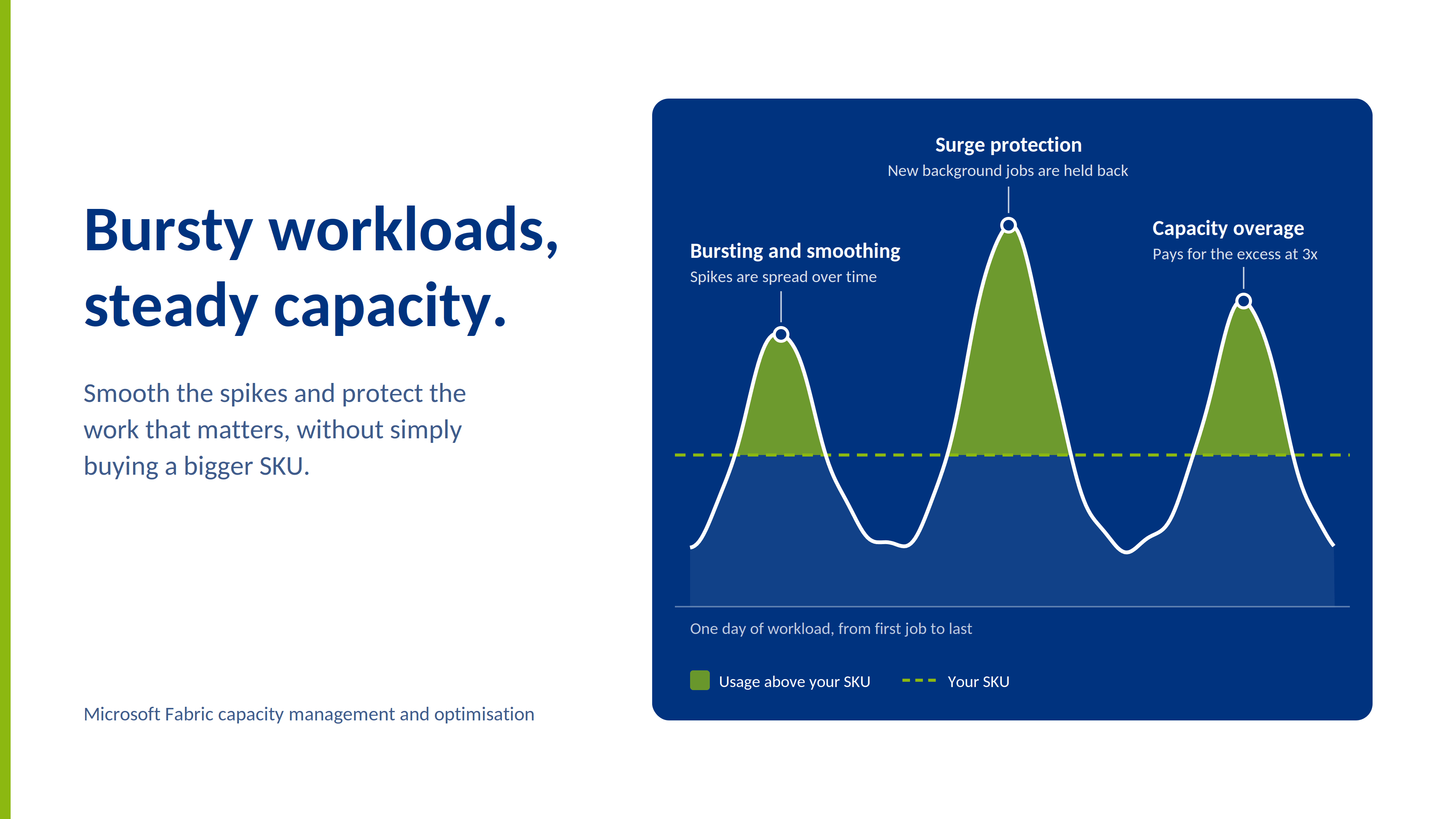
You have invested in Fabric, and data is arriving from multiple source systems, some of which is delivered as JSON files into your OneLake that require reading and writing into your Lakehouse and/or Warehouse to be used for reporting and analysis. The files can land at any point and can range significantly in volume and in size. That makes it hard to predict what size of capacity you need at any one time. It’s like running a restaurant where guests turn up without booking: staff for your busiest night and you overpay all week, staff for a quiet night and the kitchen buckles at the first rush.
Fabric has a built-in way of coping with bursty, unpredictable workloads like this. Its first line of defence for spikes is bursting and smoothing: jobs can briefly use more than your SKU, and that usage is spread over time, much like paying for a big purchase in instalments rather than all at once. The options below are controls you can layer on top of that.
Ways to manage these scenarios
Proactive optimisation of workloads
Spark notebooks are usually heavy consumers of CUs, so optimising your Spark notebooks is a good place to start. Use the Spark UI to identify which parts of your workflow are consuming resources and refactor accordingly. Spark is a distributed compute engine, so even a relatively simple transformation can consume significant resource relative to the action you are trying to perform. A good rule of thumb is to use Spark for ingestion and heavy transformations to get the benefits of the distributed compute, and use Python notebooks for lighter work as they’re single node and usually use less compute, much as you wouldn’t send a lorry to deliver a single parcel.
On-demand billing for Spark (previously Autoscale Billing)
This allows you to move your Spark onto separate pay-as-you-go compute, so it no longer draws from your shared pool of compute (like hiring your own van rather than queueing for the shared company one). If your Spark ETL operations are acting as a noisy neighbour and disrupting other workloads in your capacity then this ensures it won’t impact them in future. It can save money if it lets you run a smaller SKU, but it’s billed separately, so it isn’t automatically cheaper. There is a separate page on the Fabric Capacity Metrics app to view usage but costings are found in Azure Cost Analysis page in the Azure portal. Unlike your capacity, on-demand billing doesn’t burst or smooth. You set a maximum CU limit, and once Spark reaches it, new background jobs queue until compute frees up. Microsoft has also announced that on-demand billing is expanding beyond Spark to other Fabric workloads (see its FabCon Europe 2026 announcement), so check what is available on your capacity. For the detail on Spark, see Microsoft’s on-demand billing overview.
Capacity Overage
Instead of reaching the point of throttling, Fabric can bill the excess consumption through Azure billing, rather like a taxi surge fare: fine for getting you home once, ruinous as a daily commute. It is charged at 3 x the PAYG rate. You can set a 24-hour rolling threshold to cap spending, but keep an eye on your Azure bill. That makes it good to use for temporary spikes but not a long-term strategy in itself. Microsoft recommends keeping the threshold below one third of daily CU hours (to work this out, multiply your F SKU number by 24 e.g. 64 CUs x 24 = 1,536 CU hours per day, so a limit of 512 CU hours is advised for an F64). Beyond that, from a financial standpoint you may as well scale up to a higher SKU. Overage is now enabled by default on newly created capacities, so check the setting and the threshold on each one rather than assuming it is off. For more detail, see Microsoft’s capacity overage overview.
Surge protection
This rejects new background jobs before your capacity enters deep throttling (jobs already running continue), like a bouncer who stops new guests entering once the club is nearly full but doesn’t throw out anyone already inside. It works alongside Capacity Overage: overage absorbs the small routine overloads, while surge protection limits how much new background work piles on. You can set it at capacity level or, with workspace-level surge protection (preview), cap how much any one workspace can consume, so no single workload takes all the headroom. It’s particularly useful where data engineering and reporting share one capacity: rejecting background usage helps stop a heavy data engineering job from locking out report users. (Be aware that overage keeps the capacity out of throttling, so on its own it can let new large jobs start. Microsoft recommends a surge protection limit of 100% if you want background rejection to keep working). For more detail, see Microsoft’s surge protection guide.
Split workloads by criticality
Because each workspace is assigned to a capacity, it is a good idea to put your reports in a separate workspace to your data engineering workloads for example. If these workspaces share the same capacity then you can still protect your reports by setting the workspace as mission-critical, meaning they're exempt from workspace-level surge limits. (Note it’s not a complete shield, more a priority lane than a private runway: mission-critical workspaces are still subject to capacity-level surge protection, and if the capacity as a whole runs out of CUs and begins throttling, they are throttled along with everything else). You can even put development/test workloads in a separate workspace to your production workloads and use different capacities for them, and pause your development/test capacity when you aren’t using it to save money.
Scale up or down
A pay-as-you-go SKU can be scaled temporarily to clear debt or absorb known peaks, like taking on extra staff for the Christmas rush. Weigh that against the cost of a permanently bigger SKU.
Schedule hygiene
Make sure you stagger regular jobs, avoid overlapping orchestrations, and move any maintenance activities to off-peak hours.
Workload efficiency
Make sure you’re being efficient with your workloads by avoiding many tiny jobs and using high-concurrency sessions for example.
Automated pausing of your capacity (if done correctly!)
If you are genuinely not using the capacity for a sustained period of time e.g. overnight then this can be a good cost saving option. You will need to ensure the resume happens before any scheduled jobs or business hours or event-driven ingestion. You should also confirm this is actually a cost saving exercise - pausing only saves money if the idle period is long enough that the hours saved outweigh the outstanding smoothed usage. It’s like switching the boiler off overnight: you still pay for the hot water you’ve already used. Microsoft’s pause and resume guide explains how that remaining usage is billed.
Used together, these controls can let a conservative Fabric SKU avoid constant throttling without paying for more capacity than you need most of the time. As your Fabric estate grows, keep an eye on how compute is shared across teams, how critical workloads are protected from noisy neighbours, how unexpected spikes are handled, and when increasing the SKU is a better answer than further optimisation. That ongoing monitoring is a core part of the capacity administrator’s job.
How PTR can help
Capacity is not a set-and-forget decision. We can help you balance performance, cost and protection for the workloads your business relies on.
If you’re not sure where to start, our companion article, “How to Monitor Your Microsoft Fabric Capacity”, walks through the tools you’ll need to see what’s happening on your capacity. For a plain-English version, try Is Your Fabric Capacity About to Trip the Fuse?
PTR combines hands-on Fabric consultancy with training. We can start with a Data Platform Health Check (an assessment covering capacity sizing and refresh patterns, among other things), then identify what’s driving your peaks, put the right guardrails in place, and help your team build the skills to keep it running smoothly, with our Fabric training courses.
If you’d like a hand with your Fabric capacity, or want to talk through whether to optimise, scale up or rethink how your workloads are split, get in touch at www.ptr.co.uk.
HM
Hayley Mclaughlin
Business Intelligence Consultant
With over seven years in data and analytics, Hayley specialises in end-to-end BI implementations, from design and development to delivery and support.
Frequently Asked Questions
Couldn’t find the answer you were looking for? Feel free to reach out to us! Our team of experts is here to help.
Contact Us