
Use Cases
How to orchestrate data for software vendors with Azure Data Factory
How PTR can orchestrate data across a software vendor's customer deployments with Azure Data Factory: one tested pattern, private connections, and the right order and timing for each customer.

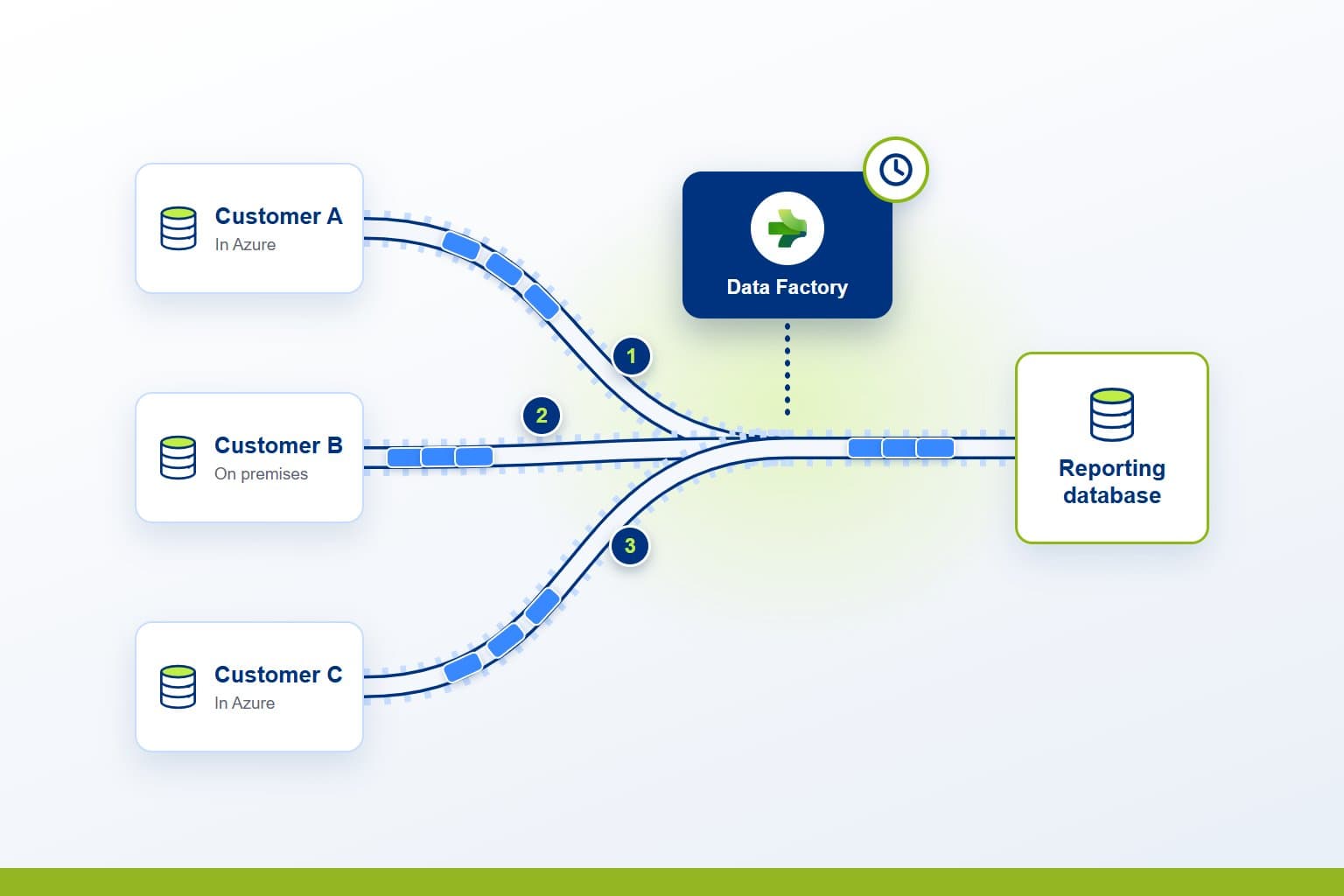
A software vendor that deploys its product for each customer ends up with a database per customer, each hosted differently and each needing its data on its own timing. PTR can build Azure Data Factory pipelines that orchestrate that data: one tested pattern that copies from every customer's database and transforms it, in order and on schedule.
The Challenge: data spread across every deployment
Each customer runs its own deployment of your product. Some are in Azure, behind private endpoints with public access turned off. Others run on a server in the customer's own network, and a few allow no connection out at all. Everything built on the data depends on collecting it and shaping it reliably, and a script written for each customer does not keep up as the customer base grows.
Teams need to be able to:
- Collect data from every customer deployment, in Azure or on premises
- Run copies and transformations in the right order
- Refresh each customer's data on the timing it needs
- Reuse one tested pattern instead of building pipelines for each customer
- Keep customer databases off the public internet
What PTR can build: orchestration for every customer
We can build an orchestration layer in Azure Data Factory, shared across your customer deployments. Pipelines copy data from each customer's application database, then run T-SQL stored procedures that persist the transformations, loading a reporting database or whatever destination your product needs. Wrapper pipelines run the steps in sequence, and triggers set the timing.
The same pattern reaches each deployment however it is hosted. In Azure, a managed virtual network connects through private endpoints, so databases keep public access turned off. On premises, a self-hosted integration runtime on the customer's network connects out over HTTPS, with no inbound ports opened. Where a customer's network allows no connection out, SSIS packages can mirror the same steps inside it.
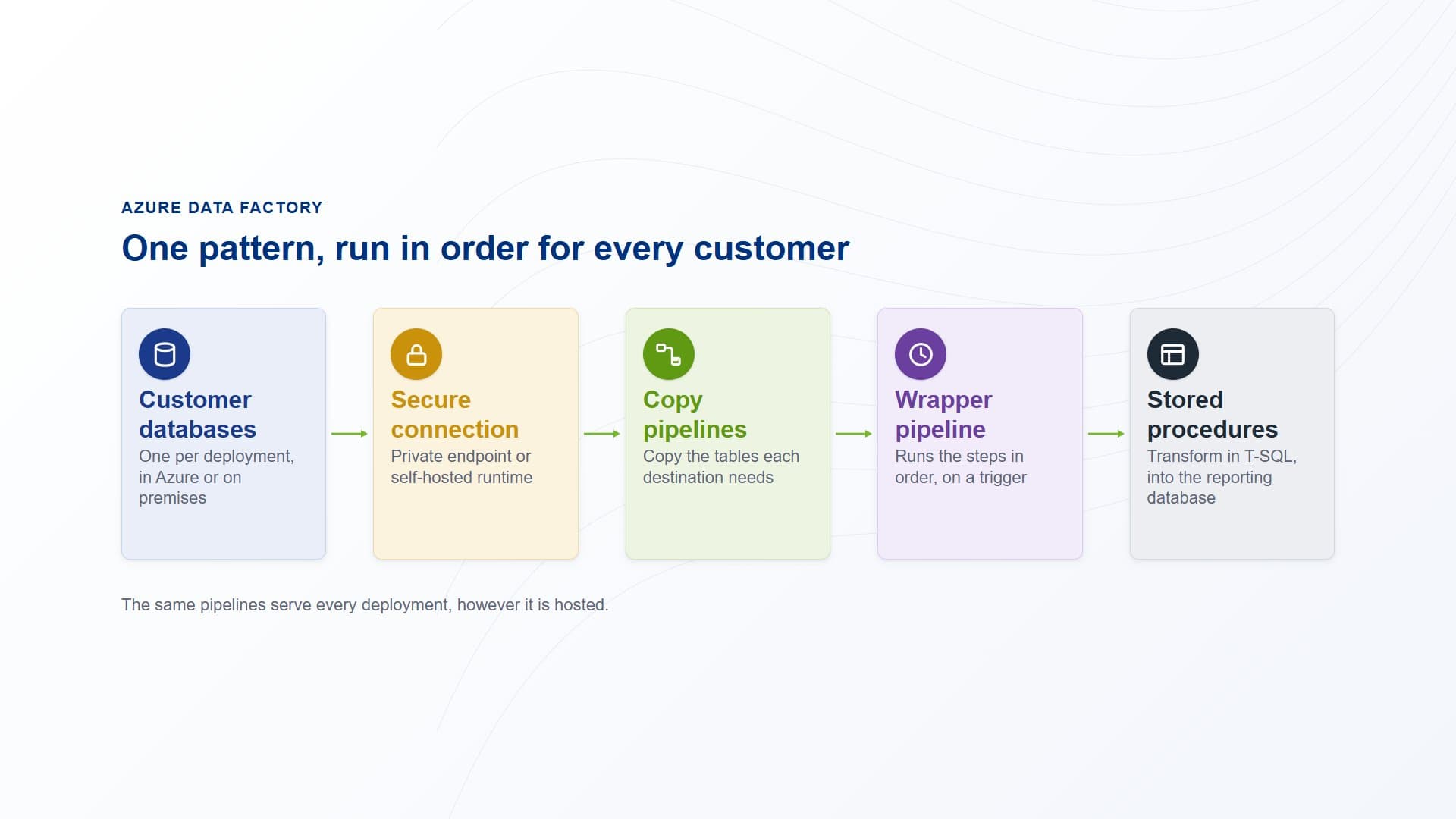
Azure Data Factory reaches each customer's database through a private endpoint or a self-hosted integration runtime, copies the data, then runs stored procedures in order.
How PTR builds it: from one pattern to every customer
Agree the pattern with your team
We design the copy and transformation pattern with your developers, test it against your source data, and adapt it to the skills your team already has, so they can run it and extend it themselves.
Copy, then transform
Each pipeline copies the tables its destination needs, then runs Stored Procedure activities that persist the transformations in T-SQL. Keeping the logic in T-SQL keeps it readable to the people who already know the database.
Connect every deployment
We set up the connection each kind of deployment needs. Azure deployments use managed private endpoints. On-premises deployments use a self-hosted integration runtime on the customer's network, often on the existing SQL Server. Customers who stay isolated get SSIS packages that mirror the pipelines.
Set the order and the timing
Wrapper pipelines use the Execute Pipeline activity to run each step in sequence. Schedule triggers run them at set times, and tumbling window triggers run them over fixed intervals, with retries and backfill when a window is missed.
What it gives your teams: data collection that scales
- One pattern for every customer:a new deployment is connected and configured, not built again.
- Private connections:databases stay off the public internet, reached through private endpoints or a runtime that only connects out.
- The right timing for each need:each pipeline runs on the schedule its destination needs, not one schedule for everything.
- Logic your team can read:transformations live in T-SQL stored procedures, next to the data they shape.
In practice, when a new customer goes live, your team connects its database to the pipelines you already run, and its data arrives in order, on the schedule it needs.
Our view: orchestration belongs in one place. Data Factory gives every customer the same tested pattern, and that pattern carries across to Data Factory in Microsoft Fabric when you are ready to move.
Orchestrate your customer data in one place
Stop writing a new script for every customer deployment. Talk to us about orchestrating your product's data with Azure Data Factory. PTR provides consultancy, training and support in Azure data engineering and Microsoft Fabric.
Call 0118 979 4000 or Email info@ptr.co.uk.
Related Articles
Frequently Asked Questions
Couldn’t find the answer you were looking for? Feel free to reach out to us! Our team of experts is here to help.
Contact Us