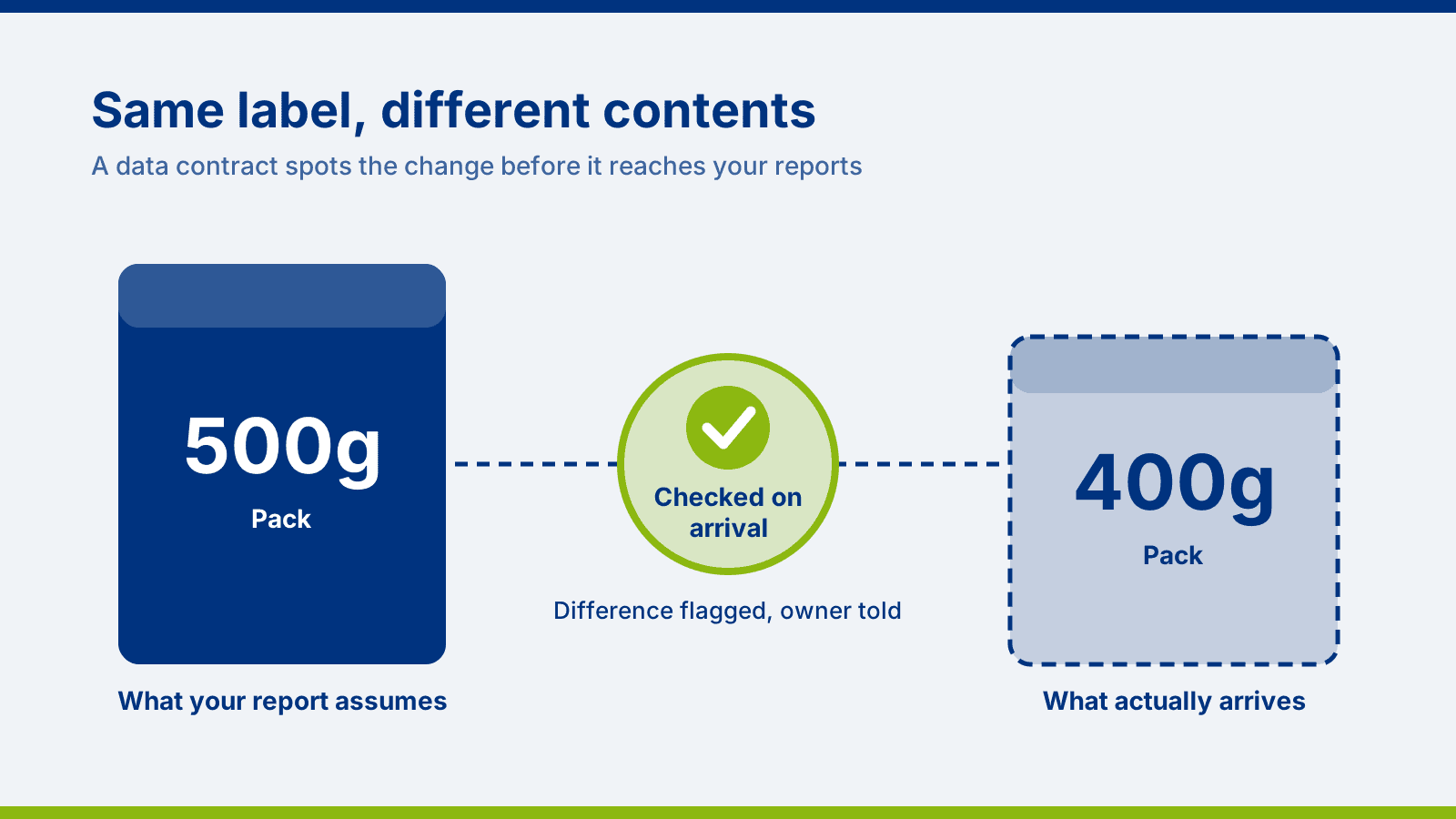
A supplier moves from 500g packs to 400g packs. The price on the invoice is unchanged, the delivery arrives on time and nobody mentions it. Your costing sheet still assumes 500g, so every margin figure is a little wrong, and it stays wrong until someone weighs a pack or the quarterly numbers look odd.
Data does the same thing. A supplier renames a field in its file, a software upgrade changes how dates are written, or a new product code appears that nobody has mapped. The reports carry on refreshing on schedule and look normal. The figures are wrong, and the first person to notice is usually a manager or a client rather than the team that owns the data.
A failed job gets noticed straight away. A job that succeeds with the wrong data can go unnoticed for weeks, and in that time people make decisions on figures that look perfectly reasonable.
The damage builds in four places. Trust comes first: people act on figures they believe, and each unexplained error makes the next report easier to dismiss, as we explore in
Why Your Business Doesn't Trust Power BI (And It's Not Power BI's Fault). Cost is next. A problem caught when the data arrives is a small fix, but one found weeks later means correcting reports, re-running loads and explaining figures that have already been shared. Time follows, because someone has to trace the cause, usually under pressure, and that someone is normally one of your most capable people. Reputation matters most where reports go to clients.
A data contract is the specification you agree with a data supplier, with someone checking every delivery against it. In the packet example, it is the agreement that a pack holds 500g and the goods-in check that weighs one. For data, it records which fields to expect, which rules the data must meet, when it should arrive and who to contact when something changes.
A specification in a drawer does not protect you. What makes a data contract useful is that the check happens automatically each time data arrives, so a mismatch is known straight away rather than weeks later.
Suppose a supplier file arrives at 6am with one field renamed. Without a contract, it loads as normal, a key figure drops and a manager or client asks about it a few days later. Hours go on finding the cause, then the reports are corrected and the wrong figures explained to people who have already seen them.
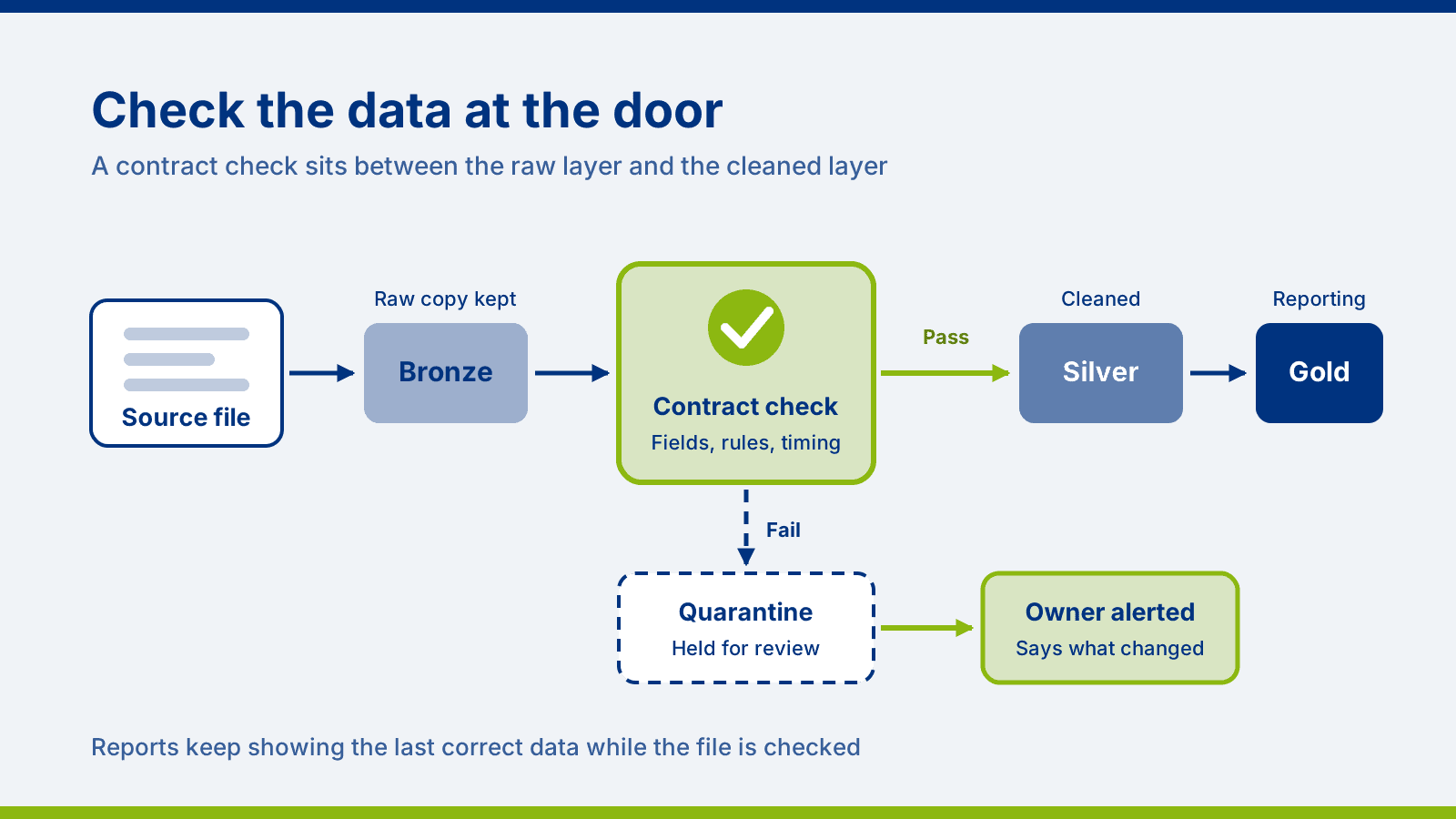
With a contract, the file is checked on arrival and held back. Reports carry on showing the last correct figures, which means a report may be a little out of date rather than wrong, and a clear "last updated" note on the report helps people see that. The data owner gets an alert saying exactly which field is missing and from which supplier. They either contact the supplier or approve the change if it was expected, and the file is then reprocessed.
Not every change needs to stop the line. A new optional field can usually be accepted automatically, while a missing or renamed field should be held for review. Agreeing that in advance is part of the contract, and it gives you a named owner and a record of what was checked and when.
Fabric gives you the tools to check data as it arrives and hold back anything that fails. For most data sources there is no single switch for it, though, and some Fabric conveniences keep data flowing by adapting automatically when a source changes. Without checks in place, a renamed field can then reach your reports without anyone being told. Choosing the right pieces and joining them into a reliable process is where most organisations need support, and our
technical companion article shows how it is built.
AI agents for data engineering are also arriving in Fabric, currently in preview. They can speed up build work, but they check data against the rules they are given, and those rules start with the business saying what correct looks like. Our article on
data fundamentals makes the same point for AI more broadly.
Automated checks catch problems, and agreements between people prevent them. Name an owner for each important data source, on both the supplying and the receiving side, and agree how much notice suppliers and system owners will give before they change what they send. Ownership is one of the adoption blockers we describe in
The Real Reason Fabric Adoption Stalls.
You do not need to cover everything at once. Begin with external feeds and the sources behind the reports your board and clients see, then extend from there. You cannot control every outside source, so you will want detection alongside prevention.
If a source system changed its format tomorrow, how would we find out before our reports were affected?
Who would be alerted, and how quickly?
Could we recover and reprocess the data if something incorrect got through?
Do we know who owns each of our data sources?
The client in our
Fabric case study wanted a single, centralised reporting environment that decision makers could rely on. Checks on incoming data are what keep an environment like that reliable once it is live.
We blend consultancy and training, so the people who own your data understand the checks we put in place. A good first step is our free discovery workshop, a one-hour call with one of our solution architects to talk through your data sources and where the biggest risks sit. If you want to go further, our data discovery project reviews your systems and pipelines over a few days and ends with a costed plan, and our
Microsoft Fabric consultancy and
Fabric training take it from there.