
Tech Tips
Azure SQL: Optimising Performance Without Overspending
low Azure SQL database? Don’t just buy a bigger tier. Learn how to tell whether you need more compute or better indexes and queries, and why tuning is an ongoing habit as your data changes, not a one-off fix, so you avoid overspending.

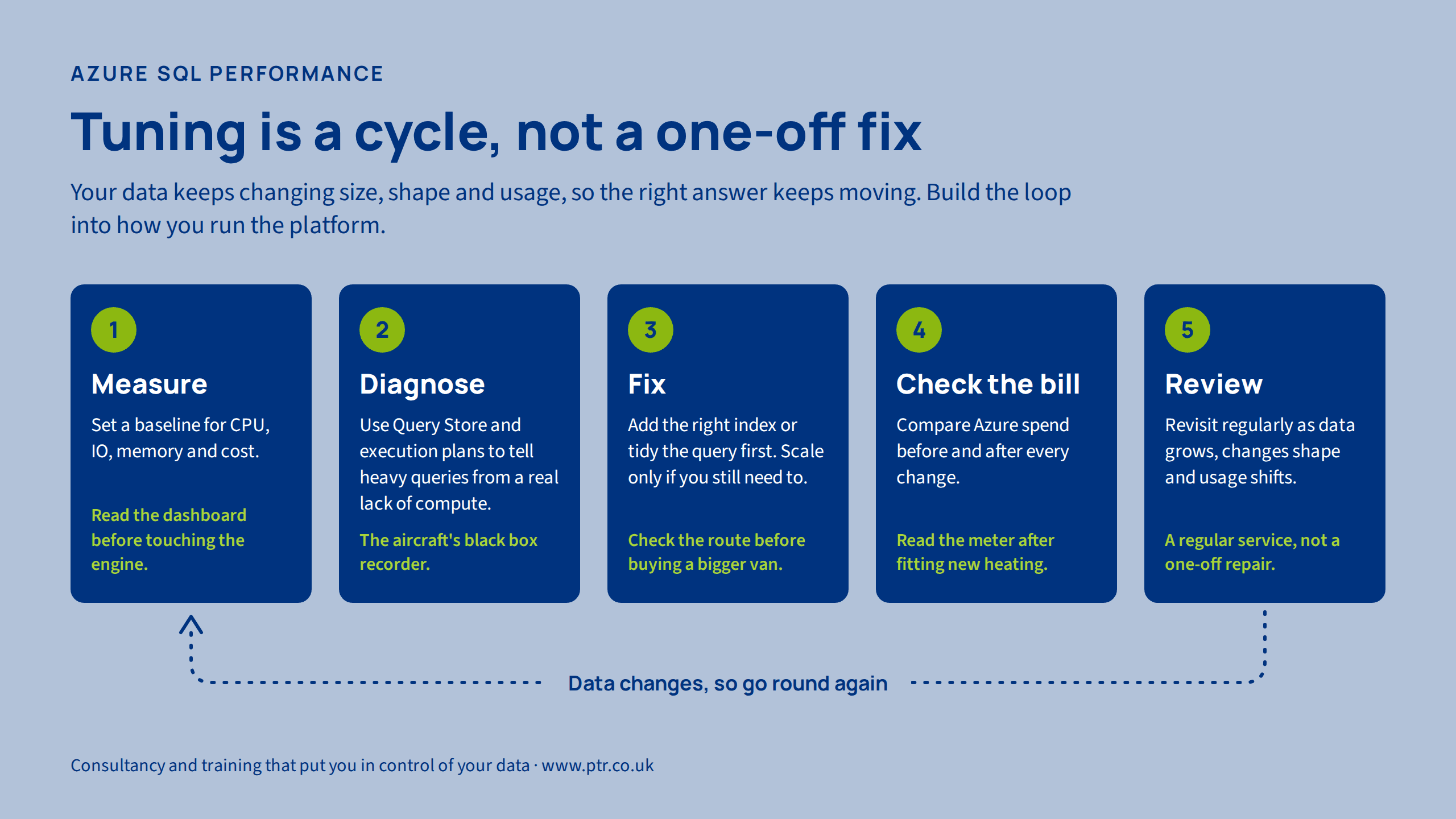
When a database feels slow, the instinctive fix is to throw money at it: move up a tier, add more cores, and hope. Sometimes that's right, but often it's like buying a bigger van because the driver keeps taking the wrong route. You pay more every month and the deliveries are still late.
Here is a practical way to work out what your Azure SQL database actually needs, and to avoid paying for capacity you don't. It's also worth saying up front that this isn't a one-off exercise. Your data keeps changing, so the right answer today won't necessarily be the right answer next year.
Step 1: Check what you're actually paying for
Before changing anything, look at your current service tier and how hard it's working. In the Azure portal, the metrics for your database show CPU, data IO, log IO, memory and worker usage over time.
Think of it as checking the kitchen before blaming the chef. Is the cooker maxed out? Is the fridge overflowing? Or is everything quiet and the food is just coming out slowly?
Consistently high on one resource (say, CPU at 90%+) points to a genuine bottleneck.
Low across the board, but users still complain, points to something else, usually the queries themselves.
Note which resource is under pressure, because that decides what kind of fix will help.
Step 2: DTU or vCore, and when serverless makes sense
Azure SQL offers two purchasing models.
DTU is like a mobile phone bundle. Compute, memory and IO are packaged into a single blended unit. It's simple, but you can't tune the ingredients separately.
vCore is like building your own package. You choose the number of cores and the hardware, and you get more visibility into what you're using. It also opens the door to flexibility such as reserved capacity discounts and the serverless option.
Serverless (available in the vCore model) is the pay-as-you-go end of the spectrum. The database scales between a minimum and maximum number of vCores, you're billed for compute by the second, and it can pause entirely when idle. It's like a taxi meter rather than a leased car: great if the car sits in the garage most of the day, expensive if you're driving constantly.
Two things to weigh up:
- Storage is still billed while the database is paused.
- The first connection after a pause takes a moment to wake the database, so it isn't ideal for anything that needs instant response around the clock.
Step 3: Is it the engine or the driving?
This is the most valuable question in performance tuning, and the one most often skipped. Is the database short of compute, or is it doing unnecessary work?
Missing indexes are the classic culprit. Imagine a library with no catalogue: to find one book, you'd walk every shelf. That's a table scan. An index is the catalogue, so the database can go straight to the right shelf. Adding the right index can cut CPU and IO dramatically, with no change to your tier at all.
Inefficient queries are similar. A query that pulls back a million rows when the report only needs fifty is like fetching the whole warehouse to find one parcel. Scaling up makes the trip faster but doesn't stop it being a silly trip.
A rough rule of thumb:
- If resources are saturated and the workload is lean and well-indexed, you probably need more compute.
- If resources are saturated because of a handful of heavy queries, fix those first. You may find you can stay on your current tier, or even go down.
Step 4: Use Query Store and execution plans as your detective tools
Query Store is like the black box recorder on an aircraft. It keeps a history of your queries, how long they took, how many resources they used, and which execution plan they followed. It's switched on by default in Azure SQL Database, so there's a good chance you already have the data.
Use it to:
- Find the top resource-consuming queries, which are often a small number doing most of the damage.
- Spot regressions, where a query that used to run quickly suddenly slows down because the database chose a different plan.
- Compare plans over time and, where appropriate, force a known good plan while you fix the root cause.
An execution plan is the database's route map for a query. Open one and you can see where the time goes: a full table scan, an expensive sort, a lookup repeated thousands of times. It's the equivalent of looking at a satnav route and spotting that it's sending you through the town centre at rush hour.
Azure SQL also offers automatic tuning, which can recommend or apply index changes and revert to the last good plan if performance drops. Treat it as a helpful colleague whose suggestions you still review, rather than a replacement for understanding your workload.
Step 5: Measure the money, not just the milliseconds
Every scaling decision has a price tag, so check it. Use Azure Cost Management to compare spend before and after a change, ideally with tags so you can see costs per database or per project.
It's the equivalent of checking the electricity bill after fitting new heating. If you scaled up and performance improved but the bill doubled, was that the best option? Perhaps an index would have achieved the same result for nothing.
Make it a habit: change one thing, measure the performance impact, measure the cost impact, then decide whether it was worth it.
Step 6: Treat it as an ongoing conversation, not a one-off fix
Here's the part that often gets missed. Tuning a database isn't like fixing a leaky tap. It's more like servicing a car, or tending a garden. You can do a brilliant job today, but the conditions keep changing, and what worked last year gradually stops working.
Your data won't stand still:
- Size changes. A query that was lightning fast on a million rows may crawl on a hundred million. It's like a shop layout that worked perfectly for 200 products but becomes chaos when the range grows to 20,000.
- Shape changes. New columns, new tables, and shifts in how the data is distributed (one customer suddenly accounts for half your orders, say) can change how the database decides to fetch things. Its internal statistics, effectively its map of what's where, can go out of date, just like a satnav that hasn't had a map update in years.
- Usage changes. New reports, new users, new integrations and new business priorities all change the workload. An index that was vital last year may be unused now, while a new one is badly needed.
- Pricing and options change. Azure evolves, and a tier or purchasing model that was best value when you chose it may not be today.
So build a rhythm into how you look after the database:
- Set a baseline of normal performance and cost, so you can see drift rather than guess at it.
- Review regularly. A quarterly check of Query Store's top queries, index usage and cost trends is often enough to catch problems while they're small.
- Revisit your tier when the business changes: new projects, growth, acquisitions or a new reporting requirement.
- Set alerts for resource thresholds and cost spikes, so you hear about problems before your users do.
- Make it a standing agenda item for whoever owns the platform, rather than something that only gets attention when people complain.
Little and often costs far less than a big emergency fix, and it keeps you from paying for capacity you only needed because of a problem nobody spotted early.
Special case: heavy ETL windows and quiet the rest of the day
This is a common pattern, and it's where overspending often hides. Imagine a restaurant that's flat out for two hours at night and nearly empty the rest of the day. You wouldn't staff the kitchen for peak service at 3pm on a Tuesday.
If your database does intensive ETL overnight and very little otherwise, you have a few options:
- Scale up for the ETL window and back down afterwards. This can be scheduled using automation or as a step in your data pipeline. You pay for the big kitchen only when you're cooking at scale.
- Consider serverless if the quiet periods are genuinely quiet. Just check that the ETL peak fits within the maximum vCore setting, and that auto-pause and resume behaviour won't disrupt your jobs.
- Tune the ETL itself. Batching, avoiding row-by-row processing and indexing target tables sensibly can shrink the window, meaning less time at the expensive tier.
- Look at reserved capacity if you do need a steady baseline. It can reduce the cost of capacity you know you'll use.
Keep an eye on the ETL window over time, too. As data volumes grow, the overnight job quietly takes longer, and the time spent at the expensive tier creeps up with it. It's like a commute that gets five minutes longer each month: you barely notice until you're running late every day. Tracking run times and the cost of the window is a simple way to spot it early.
The right answer depends on how long the ETL runs, how spiky it is, how fast the data is growing, and how much the business cares about response times in between.
The short version
- Look at what's actually under pressure.
- Pick a purchasing model that matches your usage pattern.
- Rule out missing indexes and inefficient queries before paying for more compute.
- Let Query Store and execution plans show you where the time goes.
- Check the bill after every change.
- If your workload comes in bursts, don't pay peak prices all day.
- Remember your data keeps changing, so make performance and cost a regular review, not a one-off project.
How PTR can help
Getting this balance right is as much about experience as tooling, and because performance tuning is ongoing, the best results come from building the right skills and habits in-house. PTR combines consultancy with training, so we can review your Azure SQL environment, identify what's driving cost and performance, and upskill your team so they can keep it in good shape as your data evolves. Our Data Platform Health Checks and DBA assistance are a good starting point, and can be repeated at sensible intervals as your data and workloads change. Our Azure training can help your team get confident with tools like Query Store.
If you'd like a second pair of eyes on your Azure SQL setup, or want to talk about putting a regular review in place, get in touch at www.ptr.co.uk.
DB
David Birch
Business Intelligence Consultant
Dave works with a variety of clients, from start-ups that require advice on setting up their first BI resources, to large and mature businesses, who require collaboration on long-term projects.
Frequently Asked Questions
Couldn’t find the answer you were looking for? Feel free to reach out to us! Our team of experts is here to help.
Contact Us