It is 7.45 on a Monday morning. The sales director opens the weekly dashboard and the numbers look odd. Friday’s revenue is missing, and Thursday’s appears to have doubled.
The load that should have brought in Friday’s sales hit a network timeout halfway through. Someone spotted the failure and clicked “rerun”. The rerun started from the beginning, loaded Thursday’s rows a second time, then failed again on the same flaky source connection before it reached Friday’s. Nobody made a mistake. The pipeline had not been designed to fail safely.
You cannot stop a pipeline failing. You can decide what happens when it does.
For the business, a failed load costs more than an engineer’s morning. Decisions get made on figures nobody quite trusts, analysts spend the day reconciling spreadsheets, and the next odd number starts an argument about whose data is right.
A lift call button shows the behaviour we are after. Press it once or press it six times and one lift arrives, because the system already knows a request is waiting. A well-built load works the same way: run it twice and the data ends up exactly as if you had run it once.
This article covers why pipelines break and four design habits that make a fragile overnight job recover on its own: restartability, deliberate error handling, sensible retries and protection against duplicate data.
When we review struggling data platforms for clients, the same handful of causes come up again and again. Few of them are exotic.
Cause | What it looks like | Usually temporary? |
Network and connectivity | Timeouts, dropped connections, a VPN or gateway blip | Yes |
Source system unavailable | Maintenance window, overnight backup, API rate limit reached | Yes |
Resource pressure | Deadlocks, locked tables, capacity throttling, out-of-memory | Often |
Expired credentials | Rotated password, expired secret or certificate | No |
Schema drift | A column renamed, added or retyped in the source | No |
Bad data | Nulls in a key, text in a date field, an unexpected value | No |
Late or missing files | The supplier’s file has not arrived yet | Sometimes |
Logic errors | A join that fans out, a filter that silently drops rows | No |
The final column matters more than anything else here. A failure that will clear in five minutes needs a different response from one that will fail every time until someone intervenes. Most fragile pipelines treat both alike.
A restartable pipeline can be run again after a failure and finish the job without manual clean-up. That has to be designed in from the start, because it is hard to bolt on later.
One enormous step that extracts, transforms and loads twenty tables in a single pass gives you one outcome: everything worked or nothing did. Split it into one unit of work per table or partition, and a failure on table 14 no longer means redoing tables 1 to 13.
A control (or audit) table is the backbone of a restartable process. For each unit of work it records:
Batch ID: a unique identifier for this run
Object: the table, file or partition being processed
Status: Pending, Running, Succeeded or Failed
Watermark: how far the load got, for example the highest ModifiedDate loaded
Start and end times, row counts and the error message
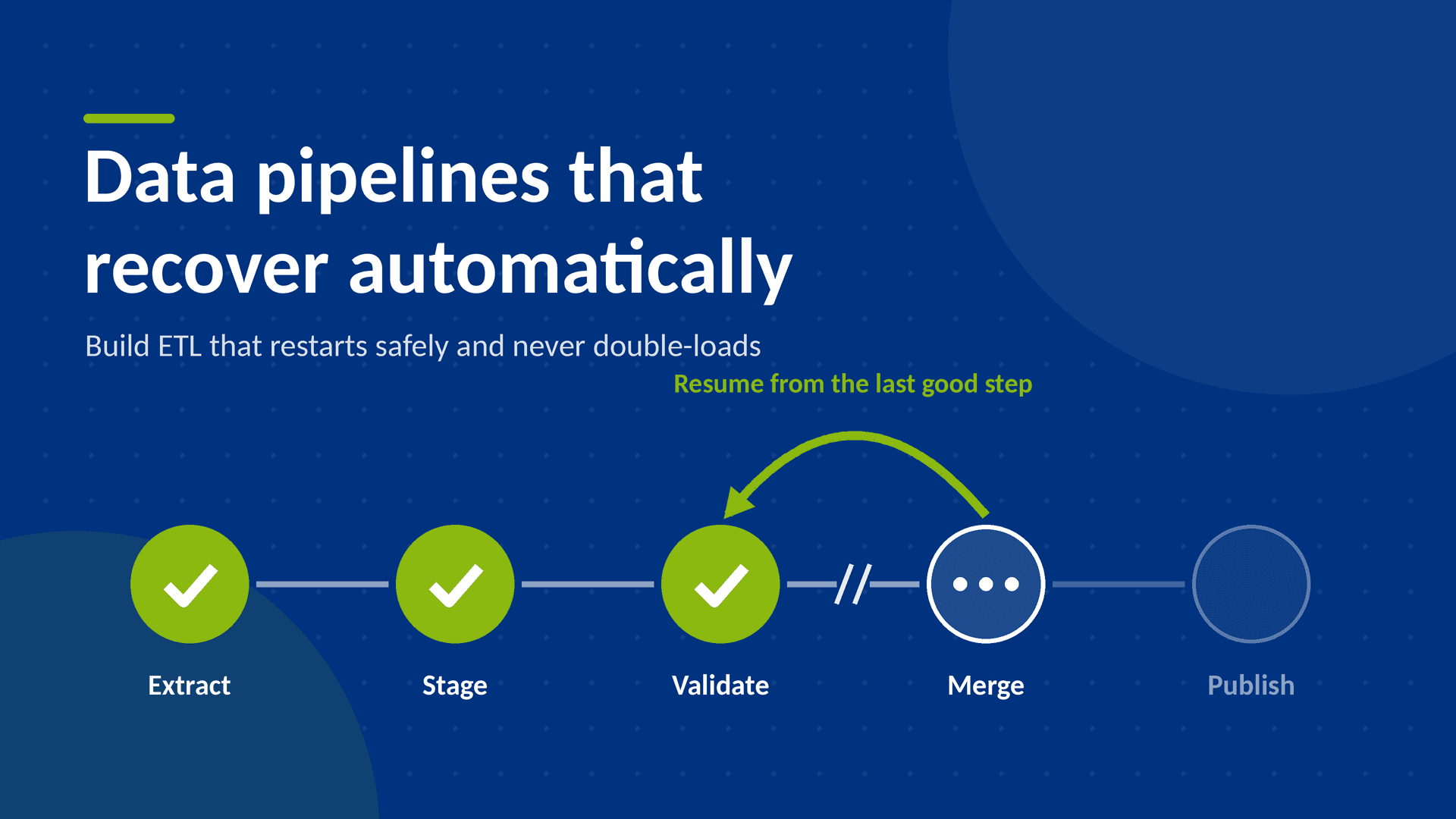
When the pipeline starts, it reads the control table and only processes what has not yet succeeded. A rerun becomes a resume.
Incremental loads that pull “everything since yesterday” break the moment a run is skipped or delayed. Store the high-water mark that was actually loaded, and move it forward only after the load has committed. If the run fails, the watermark stays put and the next run picks up exactly where the last good one finished.
Land data in a staging area and validate it. Only then publish it to the tables your reports read from, ideally inside a single transaction. A failure part-way through staging leaves your production tables untouched, and the staging area can be truncated and reloaded.
For supported sources, Fabric mirroring replicates a database into OneLake continuously, so there may be no incremental load of your own to build, restart or repair. It is worth checking your source against the supported list before you write another watermark routine.
Good error handling starts with a decision, not a try/catch block: what kind of failure is this, and who needs to act on it?
Timeouts, throttling, deadlocks and brief outages usually clear by themselves. These are the cases for automatic retries, covered in the next section. Nobody needs to be woken up.
An expired credential or a renamed source column will fail on the first attempt and on the fiftieth. Retrying delays the alert and wastes compute. Stop, log the detail and notify the person who can fix it.
If one row in a million has text in a date column, the whole load rarely needs to fail. Route the offending rows to a quarantine (or “rejects”) table along with the reason and the batch ID, and let the good rows carry on. Then set a threshold that suits the data. A handful of rejects is a data quality task for tomorrow, but if 20% of rows are rejected, something upstream has probably changed and the load should stop.
An alert that says “Pipeline failed” is little help at 7am. Every logged error should answer four questions:
Which pipeline, step and object failed?
Which batch was it, and what was the watermark?
What was the actual error message from the source or engine?
Is it safe to rerun?
If the person reading the alert has to open three tools to work out what went wrong, the error handling is not finished.
Retries are the cheapest resilience you can add, and one of the easiest to get wrong. A few principles keep them useful.
Retry at the lowest sensible level. Retry the single copy or API call that failed, not the whole pipeline, because rerunning everything multiplies the load on the source and widens the window for duplicates.
Back off between attempts. Hammering a struggling server every two seconds makes things worse, so increase the wait each time (for example 30 seconds, then 2 minutes, then 5 minutes). A small random delay, known as jitter, stops several parallel activities from all retrying at the same instant. Fabric now offers an “Increasing delay” option to cover this.
Cap the attempts. Three to five retries is a sensible rule of thumb for most transient problems. After that, treat it as a real failure and alert. Retry only the error types you identified as transient, because repeated login failures can lock a service account out.
Retry only what is safe to repeat. If a step had already written half its rows before it failed, retrying it blindly will write those rows again. That is the subject of the next section.
In Azure Data Factory and Fabric Data Factory pipelines, most activities have retry, retry-interval and timeout settings in their properties. They are easy to overlook, and the defaults may not suit a long-running production load, so check them deliberately.
Duplicates are the most damaging side effect of a failed-then-rerun pipeline, because nothing visibly breaks. The load succeeds, the dashboard refreshes and the totals are wrong.
The cure is idempotency, which is the lift button again: running the same step twice with the same input leaves the target in exactly the same state as running it once. There are several ways to achieve this.
An INSERT adds rows every time it runs. A MERGE on a business key updates rows that already exist and inserts only the new ones, so a rerun is harmless.
MERGE dbo.FactSales AS tgt
USING stg.Sales AS src
ON tgt.OrderID = src.OrderID
AND tgt.OrderLineNo = src.OrderLineNo
WHEN MATCHED AND tgt.RowHash <> src.RowHash THEN
UPDATE SET tgt.Quantity = src.Quantity,
tgt.NetAmount = src.NetAmount,
tgt.RowHash = src.RowHash,
tgt.BatchID = src.BatchID
WHEN NOT MATCHED BY TARGET THEN
INSERT (OrderID, OrderLineNo, Quantity, NetAmount, RowHash, BatchID)
VALUES (src.OrderID, src.OrderLineNo, src.Quantity, src.NetAmount, src.RowHash, src.BatchID);
The RowHash comparison is optional, but it avoids rewriting rows that have not changed. Fabric Warehouse supports T-SQL MERGE, and in a Fabric Lakehouse the same idea applies using Delta Lake’s MERGE INTO.
For loads organised by date or period, delete the slice you are about to load and reload it in the same transaction. Reloading 9 November twice still leaves you with one copy of 9 November.
Writing the batch ID onto every loaded row means a bad or partial run can be removed with a single targeted DELETE before retrying. It also makes “where did this row come from?” quick to answer.
Where your platform enforces it, a unique constraint on the business key turns a silent duplicate into a loud failure, and a loud failure is easier to fix than a quietly overstated revenue figure. Fabric Warehouse and Delta tables don’t enforce unique constraints, so run a post-load duplicate check on the business key instead and alert if it returns any rows:
SELECT OrderID, OrderLineNo, COUNT(*) AS Copies
FROM dbo.FactSales
GROUP BY OrderID, OrderLineNo
HAVING COUNT(*) > 1;
For file-based loads, record each file name (or better, a hash of its contents) in the control table once it has loaded. Before processing a file, check it is not already there, then move it to an archive folder.
Here is how the pieces combine into a single pattern that we use as a starting point on client projects.
Recoverable load pattern: 6 steps, 1 decision
The watermark only moves at step 6, after the merge has committed. So whatever fails, and wherever it fails, the next run starts from known-good data and the merge makes any repeated rows harmless.
In Azure Data Factory or Fabric Data Factory this maps onto standard activities:
A Lookup activity reads the control table and returns the units still to process.
A ForEach loop runs each unit, in parallel where the source can cope.
A Copy activity extracts to staging, with its retry count, retry interval and timeout set deliberately.
A Stored procedure (or notebook in a Lakehouse) validates the data and runs the MERGE and control-table update in one transaction.
An on-failure path logs the error and sends an alert, for example to a Teams channel or by email.
Because the control table drives everything, “rerun the pipeline” is a safe instruction to give at 7am.
A pipeline that recovers silently is useful, until it recovers silently from the same problem every night for a month. Watch the patterns as well as the failures.
Retry counts trending upwards often signal a source system that is starting to struggle.
Row counts outside the normal range, whether zero or double the usual, deserve an alert even when the run succeeded.
Run durations creeping up point to growing data volumes or a missing index.
Reject table growth shows a data quality issue that someone upstream needs to hear about.
Use this checklist to see how your own pipelines measure up:
☐ Each table or partition loads as its own unit of work
☐ A control table records batch ID, status and watermark for every unit
☐ Watermarks only move forward after a successful commit
☐ Data lands in staging and is validated before publishing
☐ Transient and permanent errors are handled differently
☐ Bad rows are quarantined, with a threshold that stops the load
☐ Retries use backoff, have a cap and target only transient errors
☐ Loads use MERGE, partition replacement or another idempotent pattern
☐ Every row carries a batch ID
☐ Alerts say what failed, where, and whether it is safe to rerun
☐ You have deliberately killed a run halfway through and checked the rerun result
The last item is the one most teams skip. Try it first on your most important load, in a test environment, before relying on any of the others.
PTR designs and reviews data pipelines that recover on their own, so your reports are right first thing every morning.
If you would rather build the skills in-house, our
training courses and
tailored technical training cover SQL, Azure and Microsoft Fabric, including data engineering. Many clients combine the two, with consultancy to get the pattern in place and one-to-one mentoring so their own team can maintain it.
To talk to us about your data pipelines, email
info@ptr.co.uk or call 0118 979 4000.